
ADVERTISEMENT
Friday, May 22, 2026
Tech | Business | Economy
No Result
View All Result
  • Technology
    • Trends
    • Telecoms
      • Broadband
    • ConsumerTech
      • Gadgets and Appliances
      • Apps
      • Accessories
      • Reviews
      • Unboxing
    • EnterpriseTECH
    • Security & Data Protection
    • How To
  • Business
    • Company News
    • StartUPs
      • Founder’s Story
      • Funding
    • Deals
    • People & Moves
    • SME & Entrepreneur Focus
    • BUSINESS SENSE FOR SMEs
    • Competition & Market Positioning
    • Commerce & Mobility
    • Travel
    • WomenPreneurs
  • Economy
    • Macroeconomic Trends
      • Macro Monday
      • TE Insights
    • Finance
      • Banks
      • Fintech
      • Insurance
      • Digital Assets
      • Personal Finance
    • Policies
      • Tech & Society
    • Market Analysis
    • Jobs & Workforce Economy
  • Features
    • Guest Writer
      • Chidiverse
      • Digital Assets
      • GameTech
    • EventDIARY
    • IndustryINFLUENCERS
    • MarkTECH
    • TBS
    • NewsEXTRA
  • Editorial
  • Brand Content
  • TECHECONOMY TV
Friday, May 22, 2026
Tech | Business | Economy
No Result
View All Result
Tech | Business | Economy
No Result
View All Result

Home » How to Use WhatsApp Screen Sharing Feature

How to Use WhatsApp Screen Sharing Feature

Peter Oluka by Peter Oluka
August 8, 2023
in How To
Reading Time: 2 mins read
0
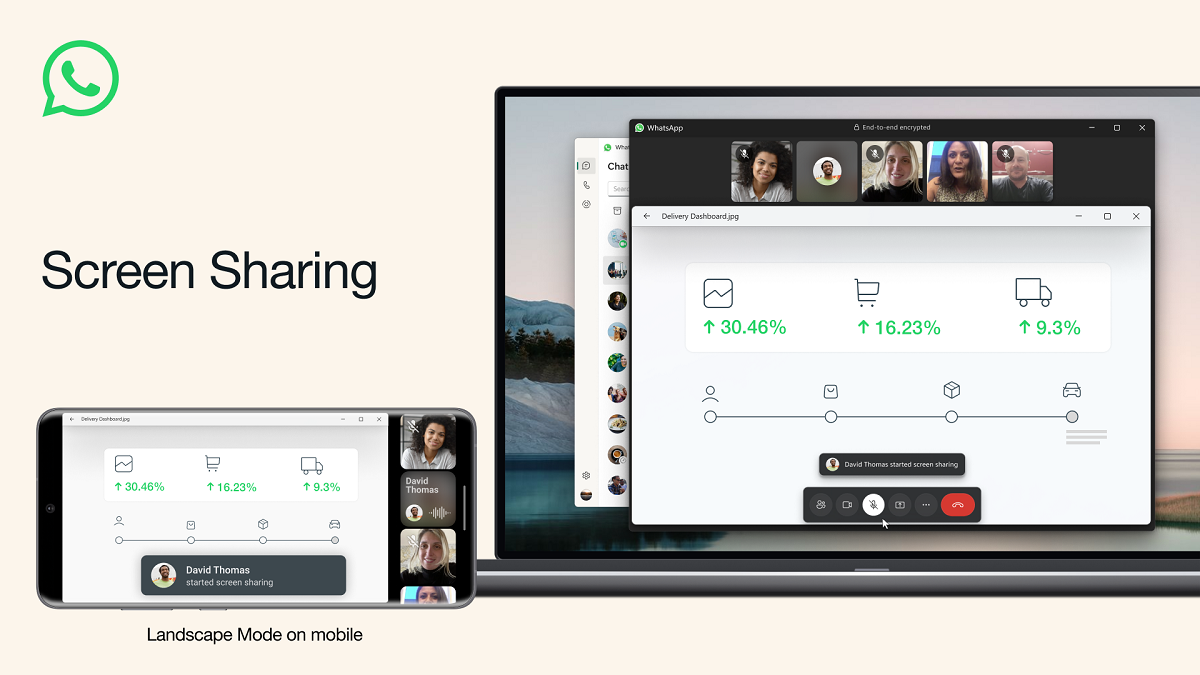
WhatsApp Screen Sharing

WhatsApp Screen Sharing

Today, August 8 2023, Mark Zuckerberg, the CEO of Meta announced the latest WhatsApp feature – screen sharing during video calls.

He said that users can initiate screen sharing by clicking on the ‘Share’ Icon and choosing between sharing a specific application or sharing the entire screen.

Zuckerberg on Tuesday announced the latest feature on WhatsApp that enables screen sharing during video calls.

The WhatsApp users can also enjoy video calls in Landscape mode for a wider and more immersive viewing and sharing experience on smartphones.

WhatsApp debuted video calling for all users on the platform in November 2016.

Subscribe to our Telegram channel for the latest updates.

Follow the latest developments with instant alerts on breaking news, top stories, and trending headlines.

Join Channel

Meanwhile, WhatsApp has announced that it is rolling out message editing support for media with captions on iOS.

“We’re adding the ability to share your screen during a video call on WhatsApp,” said Mark.

“Whether sharing documents for work, browsing photos with family, planning a vacation or shopping online with friends, or just helping grandparents with tech support – screen sharing lets you share a live view of your screen during the call,” the company said in a statement.

“Added message editing support for media with captions,” the company mentioned in the official changelog.

The company is also rolling out an updated user interface (UI) with translucent bars as well as new action sheets. The changelog also mentioned that the redesigned sticker tray with improved navigation and a larger set of stickers including more Avatars are still rolling out.

All these features will roll out over the coming weeks, the company said. Last month, the messaging platform WhatsApp had widely rolled out landscape mode support for video calls and silence unknown callers option, on iOS.

Let’s quickly tell you how to Use WhatsApp Screen Sharing Feature:

  1. Clicking on the ‘Share’ Icon: During a video call.
  2. Choosing between Options: Share a specific application or the entire screen.
  3. Enjoying in Landscape Mode: For a wider and more immersive viewing and sharing experience on the phone.

0Shares
Previous Post

How inDrive Puts Safety First with its ‘Safety Pact’

Next Post

Drugstoc’s Chibuzo Opara Wins $20,000 Prize Money in 2023 CEMEA Visa Everywhere Initiative

Peter Oluka

Peter Oluka

Peter Oluka (@peterolukai), editor of Techeconomy, is a multi-award winner practicing Journalist. Peter’s media practice cuts across Media Relations | Marketing| Advertising, other Communications interests. Contact: peter.oluka@techeconomy.ng

Related Posts

Phone draining battery and data

Your New Phone is Secretly Draining Data, Battery | Here’s How to Fix That

May 7, 2026
BVN registration in Nigeria | Database | new rules

EXPLAINER: New CBN BVN Rules Take Effect | What Every Nigerian Bank Customer Must Know

May 1, 2026

Five Smart Saving Hacks Nigerian Freelancers Need to Survive Rising Living Costs

April 20, 2026
Load More
Next Post
Chibuzo Opara and Visa Everywhere Initiative

Drugstoc’s Chibuzo Opara Wins $20,000 Prize Money in 2023 CEMEA Visa Everywhere Initiative

Leave a Reply Cancel reply

Your email address will not be published. Required fields are marked *

I agree to the Terms & Conditions and Privacy Policy.

This site uses Akismet to reduce spam. Learn how your comment data is processed.

Techeconomy Podcast
Techeconomy Podcast

The Techeconomy Podcast is a thought-leadership show exploring the powerful intersection of technology, business, and the economy, with a strong focus on Africa’s fast-evolving digital landscape.

PROTECTING INNOVATION IN AFRICA’S STARTUP ECOSYSTEM
byTecheconomy

Protecting Innovation in Africa’s Startup Ecosystem . A timely conversation for the future of African entrepreneurship.

PROTECTING INNOVATION IN AFRICA’S STARTUP ECOSYSTEM
April 29, 2026
Techeconomy
BUILDING TRUST IN AFRICA ECOSYSTEM
February 27, 2026
Techeconomy
Navigating a Career in Tech Sales
January 29, 2026
Techeconomy
How Technology is Transforming Education, Health, and Business
November 27, 2025
Techeconomy
INNOVATION IN MOBILE BANKING
October 30, 2025
Techeconomy
Search Results placeholder
ADVERTISEMENT
  • About Us
  • Careers
  • Contact Us
  • Privacy Policy

© 2026 TECHECONOMY.

No Result
View All Result
  • Technology
  • Business
  • Economy
  • Features
  • Editorial
  • Brand Content
  • TECHECONOMY TV

© 2026 TECHECONOMY.

This website uses cookies. By continuing to use this website you are giving consent to cookies being used. Visit our Privacy and Cookie Policy.