

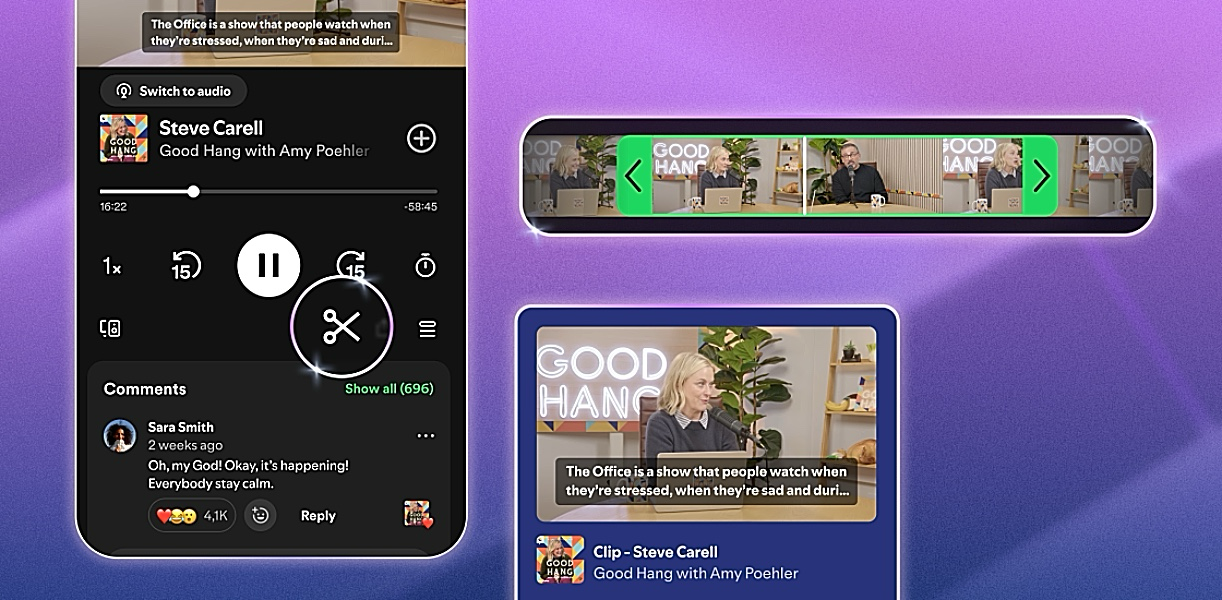
Spotify has started rolling out a new feature called Clips to allow users clip and share moments from podcast episodes directly from its app.
The feature gives listeners a way to save short sections from podcasts and send them to friends or post them on social media without searching through an entire episode.
Spotify said the rollout has started globally for both free and Premium users on mobile devices, while support for more shows will expand gradually.
Users will now see a scissors icon in the “Now Playing” screen while listening to supported podcasts. Once tapped, the tool allows them to capture a segment, trim it, preview it and either save or share it immediately.
Spotify also explained that listeners can share a full episode, chapter, timestamp or a clip through the updated sharing menu. Saved clips will also appear in a dedicated section inside the user’s library and can be added to podcast playlists.
The feature builds on the growth it has already seen with podcast Chapters, which launched earlier this year. According to Spotify, Chapters are now being saved and added to playlists more than two million times every month.
The update also shows how podcasts are becoming a bigger source of news, interviews and online discussions, especially in the technology industry where company executives appear on podcasts instead of traditional interviews.
Spotify believes clips could help podcast creators attract new listeners by making key moments easier to discover and circulate online. The company said early testing showed that podcast saving activity increased when clips were enabled.
In a statement announcing the launch, Spotify said: “Whether it’s a piece of advice that reframes how you think, a conversation that makes you laugh, or a segment you know a friend needs to hear, those moments are often what turns a casual listener into a devoted fan.”
“With clips, listeners can now capture, revisit, and share the exact moments from podcasts that resonate most, without having to search through an entire episode to find them,” the company added:
Spotify also noted that users can access the feature by tapping the scissors icon while listening, trimming the audio segment they want, then choosing to save or share it through the app’s sharing options.